Mute and push-to-talk
A global shortcut that works in every app. Hold to talk, or toggle. Tap your AirPods stem to mute and unmute.
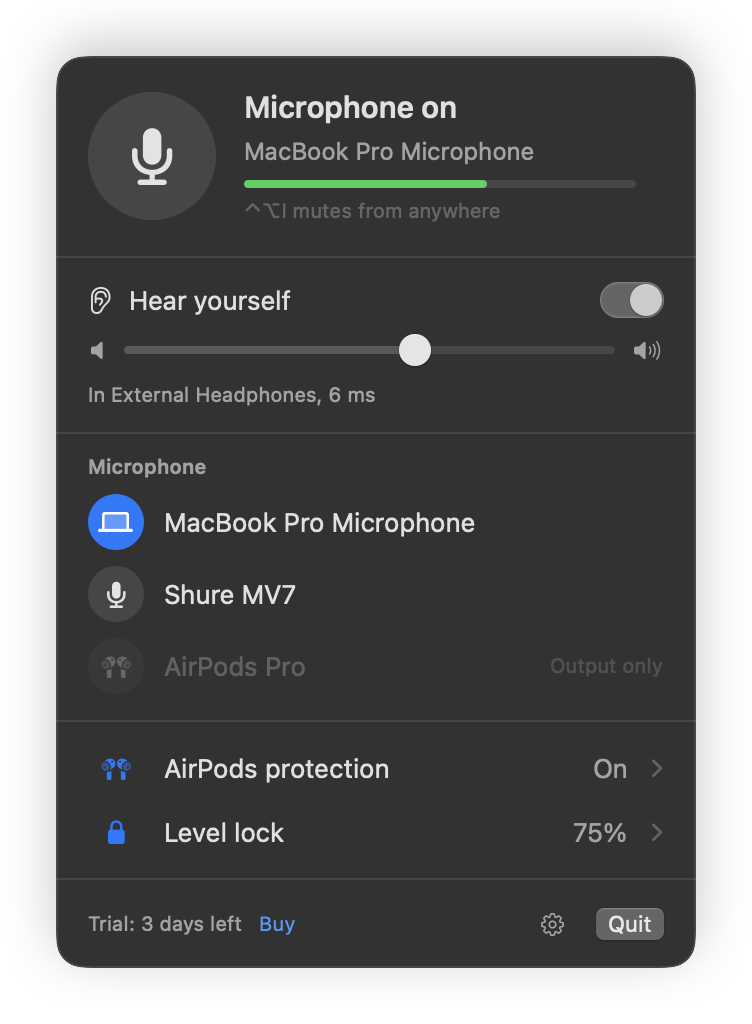
Mute from anywhere, get warned when you talk while muted, hear your own voice, and keep AirPods sounding good on calls. Parla sits in the menu bar and works with every app.
Works the same in every app that uses your mic
One shortcut, a click in the menu bar, or a press on your AirPods stem. It mutes the mic itself, so every app goes quiet at once.
With a second mic around, like your MacBook's own, Parla notices and shows "You're muted" before you finish your first sentence.
The menu bar, a small on-air pill and a glow around the notch all show if your mic is live.
Press Mute, then "Say something".
A global shortcut that works in every app. Hold to talk, or toggle. Tap your AirPods stem to mute and unmute.
Zoom does this for Zoom. Parla does it for every app, using your Mac's other mic to notice you talking. Nothing is ever recorded.
Your own voice in your headphones, with a few milliseconds of delay, so you stop shouting on calls. With a noise gate.
Zoom, Chrome and Discord love to change your input level. Parla puts it back right away, so you always sound the same.
When AirPods become your mic, music and voices drop to phone quality. Parla keeps your voice on the Mac's mic and your ears in high quality.
Mute when Zoom opens the mic. Push-to-talk only in Discord. Unmute when the call ends. Set it once.
Record five seconds and hear exactly how you sound before the call. Parla tells you if you're on a low-quality Bluetooth mic.
Lock the screen, close the lid or go idle, and your mic goes quiet on its own.
Parla reads your mic level on your Mac to show meters and the muted alert. It never records in the background and never uploads audio. Mic check recordings are deleted when you close the window. No accounts and no tracking in the app.
Smorza handles what you hear, with a volume slider for every app. Parla handles your voice. They're made to sit side by side in your menu bar.
Download Parla and use every feature free for 3 days, no email or card needed. When you're ready, unlock it for good.
Secure checkout by Polar. Your license key arrives by email. macOS 14 or later.
Any Mac with macOS 14 Sonoma or later. The notch glow shows on Macs with a notch; the other indicators work everywhere.
Yes. Parla mutes the microphone itself, not a button inside one app, so Zoom, Meet, Teams, Discord, FaceTime and everything else hear silence at the same time.
No. Parla works with the audio system macOS already has. Quit it and nothing is left running.
Bluetooth can't carry high-quality sound both ways at once, so when AirPods are used as a microphone, macOS drops everything you hear to call quality. Parla can keep your Mac's own mic as the input, so your AirPods stay in high quality.
Parla isn't notarized by Apple yet, so macOS asks once on the first launch. Move Parla to Applications, then: on macOS 15 Sequoia or later, open Parla and click Done on the warning, go to System Settings → Privacy & Security, scroll down and click Open Anyway. On macOS 14 Sonoma, right-click Parla in Applications, choose Open, then Open again. After that it opens like any other app, and updates install themselves.
Download Parla and use every feature for 3 days, no email or card needed. When it ends, buy a license to keep going.
No. You pay once and keep the version you bought, with free updates for all 1.x versions. If a big 2.0 ever comes, you can stay on 1.x forever.